
Mendeley Data: Share and Find Research Datasets

Mendeley Data is an online repository where researchers can publish, find and cite research datasets. It is separate from Mendeley Reference Manager, which is the tool for organising references and PDFs.
This guide explains what Mendeley Data is, how it differs from the reference manager, gives six steps for publishing a dataset with an example at every step, and explains licences, FAIR principles, alternatives and common mistakes.
- The service: what Mendeley Data is and how it differs from Mendeley Reference Manager.
- The method: six steps to prepare and publish a dataset.
- The care: licences, FAIR principles, ethics and alternatives.
Key takeaways
- Mendeley Data is a repository for datasets; Mendeley Reference Manager is a separate tool for references.
- Published datasets receive a DOI so that they can be cited.
- Prepare files, write a README, choose a licence and remove personal data before publishing.
- Compare it with Zenodo, OSF and Figshare and follow your funder’s data policy.
What is Mendeley Data?
It is a general-purpose repository for research data run by Elsevier.
- Purpose: to store, share and cite datasets, code and related files.
- DOI: each published dataset receives a persistent identifier.
- Search: a search tool helps people find datasets from many repositories.
- Access: anyone can browse public datasets; depositors sign in with an account.
- Website: see Mendeley Data for current features, limits and terms.
Mendeley Data vs Mendeley Reference Manager
The names are similar, but the tools do different jobs.
| Feature | Mendeley Data | Mendeley Reference Manager |
|---|---|---|
| Main purpose | Publish and find datasets | Organise references and PDFs |
| Output | Dataset page with a DOI | Bibliography and citations |
| Typical user | Researcher sharing data | Student or researcher writing papers |
| Works with Word | No | Yes, through Mendeley Cite |
| Related guide | This post | Reference management tools |
Why share data in a repository?
There are practical and scholarly reasons.
- Transparency: others can check your analysis.
- Reuse: other researchers can build on your data.
- Citation: a dataset DOI lets people cite your work.
- Funder rules: many funders and journals require data sharing.
- Preservation: a repository keeps files safe beyond your project.
Step-by-step guide to publishing a dataset in Mendeley Data
Follow these six steps. Each has an explanation and an example.
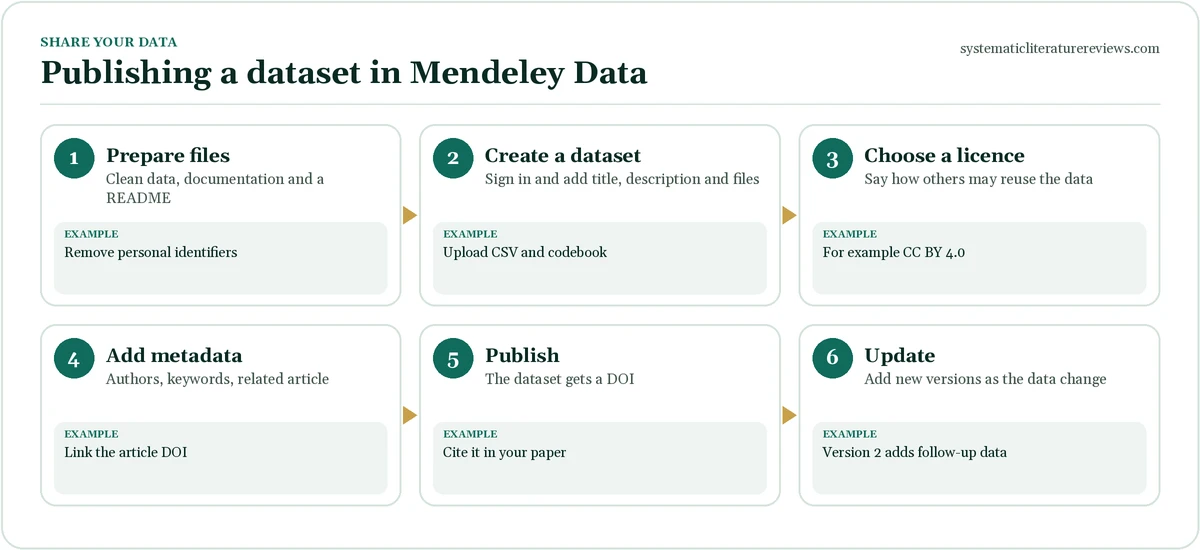
- Prepare your files. Clean the data, remove personal identifiers, use open file formats and write a README that describes the files and variables. Example: survey.csv, codebook.pdf and README.txt.
- Create a dataset. Sign in, start a new dataset and add a title, a description and your files. Example: Title: Student wellbeing survey 2025, with a two-paragraph description.
- Choose a licence. Select how others may reuse your data. Creative Commons licences are common; check the options offered. Example: CC BY 4.0, which requires attribution.
- Add metadata. Add authors with their ORCID iDs, keywords, the related article and the funder. Example: Keywords: wellbeing, students, survey.
- Publish the dataset. Review the preview and publish. The dataset receives a DOI. Example: doi: 10.17632/example.1.
- Cite it and update it. Cite the dataset in your paper and add new versions as the data change. Example: Version 2 adds follow-up responses.
Choosing a licence for your dataset
A licence tells others what they may do with your data.
| Licence | What it allows | Typical use |
|---|---|---|
| CC0 | Anyone may use the data without conditions | Maximum reuse |
| CC BY 4.0 | Reuse with credit to the author | Most research datasets |
| CC BY-NC | Non-commercial reuse with credit | When commercial use is a concern |
| Restricted access | Controlled sharing on request | Sensitive data |
- Check rules: your funder, institution and journal may specify a licence.
- Read the terms: confirm the conditions of the repository you use.
The FAIR principles for research data
The FAIR principles describe good data sharing (Wilkinson et al., 2016).
- Findable: data have a DOI and rich metadata.
- Accessible: data can be retrieved by a standard protocol, with clear access conditions.
- Interoperable: data use common formats and vocabularies.
- Reusable: data have a licence and clear provenance.
- Learn more: see the GO FAIR overview.
Ethics and personal data
Share only what you are allowed to share.
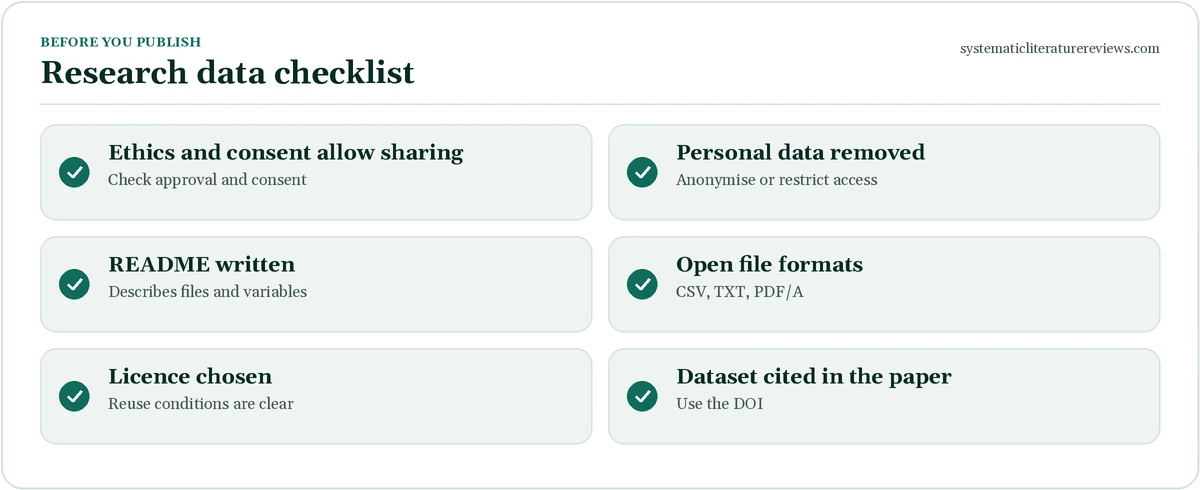
- Consent: check that participants agreed to data sharing.
- Anonymise: remove names, contact details and indirect identifiers.
- Small groups: a rare combination of age, place and job can identify a person.
- Restricted access: use a controlled-access repository if data cannot be fully open.
- Ask: consult your ethics committee or data protection officer.
Alternatives to Mendeley Data
Several repositories serve the same purpose.
| Repository | Notes |
|---|---|
| Zenodo | General repository run by CERN, free, DOIs |
| OSF | Project management with storage and preregistration |
| Figshare | General repository with institutional versions |
| Dryad | Curated repository for data linked to articles |
| Institutional repository | Often required or supported by your university |
Choose by your funder’s policy, your discipline and the support available.
Practical tips for Mendeley Data
These habits make datasets more useful.
- Write a clear README: describe each file, the variables and how data were collected.
- Use open formats: CSV and TXT are readable by any software.
- Version your data: name versions and explain changes.
- Link the paper: add the article DOI and cite the dataset in the paper.
- Include code: share analysis scripts with the data.
Common mistakes with Mendeley Data
Avoid these problems.
- Confusing it with the reference manager: you will look in the wrong place. Example: use each for its own purpose.
- Publishing identifiable data: privacy is breached. Example: anonymise first.
- No README: nobody can use the files. Example: write one.
- No licence: reuse is unclear. Example: choose a licence.
- Forgetting to cite the dataset: credit is lost. Example: cite the DOI in the paper.
For tools to organise your sources, see ZoteroBib and reference management tools.
Writing good metadata for Mendeley Data
Good metadata make a dataset easy to find and reuse.
- Title: a specific title that names the topic, the population and the year. Example: Student wellbeing survey, UK universities, 2025.
- Description: explain why and how the data were collected, the sample and any limits.
- Keywords: use terms people would search for.
- Authors: add ORCID iDs so that contributions are linked to researchers.
- Related items: link the article, the code and any earlier versions.
- Funding: state the funder and the grant number.
A README template for your dataset
A README explains the files to people who have never seen your project.
Template
Title: dataset title. Contact: name and email. Description: what the data are and how they were collected. Files: file names with one line each. Variables: name, meaning, units and codes. Missing data: how they are coded. Licence: CC BY 4.0. How to cite: suggested citation with DOI.
- Keep it plain text: a TXT or Markdown file opens anywhere.
- Update it: change the README when you add a new version.
File formats and organisation
Use formats that will still open in ten years.
| Data type | Recommended format | Avoid |
|---|---|---|
| Tables | CSV or TSV | Proprietary spreadsheets only |
| Text and documents | TXT, PDF/A | Locked or scanned documents |
| Images | PNG or TIFF | Compressed screenshots |
| Code | Plain text scripts with comments | Notebooks without outputs |
| Qualitative data | Anonymised transcripts as TXT or PDF/A | Audio with voices of participants |
- Folder structure: use clear folder and file names without spaces.
- Codebook: explain each variable and code.
- Size: check the repository’s current file and dataset limits before uploading.
Funder and journal data policies
Many organisations ask researchers to share data.
- Funders: check your grant terms for data management plans and repository requirements.
- Journals: some require a data availability statement or deposit in a recognised repository.
- Institutions: your university may have a repository, a policy and support staff.
- Plan early: write a data management plan before you collect data.
- Statement: write a data availability statement that says where and how data can be accessed.
See the discussion of the FAIR principles for guidance.
Finding and reusing datasets from Mendeley Data
You can also use the repository as a researcher looking for data.
- Search: use keywords, authors or subjects to find datasets.
- Check the licence: confirm that your use is permitted.
- Read the README: understand the variables before you analyse.
- Check the version: cite the version you used.
- Assess quality: look at the documentation, the sample and any linked article.
- Credit the creators: cite the dataset with its DOI.
Linking datasets to your references
A dataset is a research output you can cite.
- Add it to your library: import it into Zotero, Mendeley Reference Manager or EndNote as a dataset item.
- Cite in text: use the author-date or numeric style that your paper follows.
- Include the DOI: as a link in the reference list.
- Mention it in the methods: say where the data are stored and how to access them.
- Compare tools: read about reference management tools, EndNote and ZoteroBib.
Mendeley Data for students and early-career researchers
Sharing data early builds good habits.
- Thesis data: ask your supervisor if you can publish an anonymised dataset with your thesis.
- Supplements: a dataset can support an article without lengthy appendices.
- Visibility: a dataset DOI can appear on your profile and CV.
- Skills: preparing data for sharing teaches organisation and documentation.
- Get help: university libraries often offer research data support.
Mendeley Data vs other repositories in practice
When you choose a repository, think about your discipline, funder and long-term access.
- Discipline repositories: some fields have specialist repositories with curated metadata; use them when they exist.
- General repositories: Mendeley Data, Zenodo, Figshare and OSF suit most projects.
- Institutional repositories: your university may provide storage, curation and long-term preservation.
- Check preservation: look for statements about how long data will be stored.
- Check access options: see whether you can restrict access or set an embargo.
An example dataset description
The example below shows a clear, short description.
Template
This dataset contains anonymised responses from number university students to a number-item wellbeing survey collected in month and year. Files include the raw data in CSV format, a codebook describing each variable and an R script that reproduces Table 2 of the related article (DOI). Personal identifiers were removed and age was grouped into bands.
Checklist before you click publish
Run through these final checks.
- Files open: test every file on another computer.
- README complete: another person can follow it.
- No personal data: search the files for names, emails and IDs.
- Licence chosen: and consistent with funder rules.
- Article linked: add the DOI once the paper is published.
Frequently asked questions about mendeley data
What is Mendeley Data?
Mendeley Data is a free online repository, run by Elsevier, where researchers can store, publish, share and find research datasets. Each published dataset receives a persistent identifier called a DOI, so that other people can cite it and so that it remains findable. It is different from Mendeley Reference Manager, which helps you organise references and PDFs. Mendeley Data is useful when a journal or funder asks you to make your data available, but you should compare it with other repositories and check its current terms.
Is Mendeley Data the same as Mendeley Reference Manager?
No. Although both carry the Mendeley name and are linked to Elsevier, they are different tools. Mendeley Reference Manager collects references, stores and annotates PDFs and inserts citations into Word, so it is a tool for reading and writing. Mendeley Data is a repository that publishes datasets, code and supporting files with a DOI, so it is a tool for sharing the data behind research. You can use both in one project, for example by citing a dataset published on Mendeley Data in your reference manager.
Can I publish sensitive or personal data on Mendeley Data?
You should not publish personal or sensitive data unless participants have consented and the data are properly anonymised. Remove names, contact details and indirect identifiers, and think about whether a combination of details such as age, location and occupation could identify someone. If the data cannot be made fully open, consider a repository with controlled access or share only the code and a description of how to request the data. Check with your ethics committee and data protection officer before you publish.
How do I cite a dataset from Mendeley Data?
Use the DOI shown on the dataset page and follow your citation style. A common pattern gives the author, the year, the title of the dataset, the version, the repository name and the DOI as a link. Many repositories provide a suggested citation on the dataset page, which you can copy into your reference manager. Citing the dataset gives credit to the creators and allows readers to find the exact version you used. Always cite the version, because datasets can be updated over time.
Need expert help? Our experienced writers can handle the search, screening and write-up for you. Place your order in two minutes, or read how a systematic literature review works first.
Systematic Literature Reviews
Need your references sorted?
Clean, correctly formatted citations and reference lists in APA, Harvard, MLA or Chicago.