
Blog
The Best 6 Powerful Reference Management Tools You Need to Know

Introduction to Reference Management Tools for Researchers
Reference Management Tools are essential for researchers, students, and academics who need to efficiently organize and manage their references. These tools provide a systematic way of handling citations, bibliographies, and sources used throughout the research process. This section introduces these tools and why they’re crucial for the success of research projects.
Get Expert Systematic Literature Review Help
Need assistance with writing your systematic literature review? Our experts provide tailored support to ensure your research is thorough, accurate, and well-organized. Contact us today for professional help!
What Are Reference Management Tools?
- Definition: Reference Management Tools are software designed to help researchers store, organize, and manage citations for their research papers. They automatically format citations and generate bibliographies in various citation styles (APA, MLA, Chicago, etc.).
- Features: These tools allow you to import references from databases, organize them into folders, and even add notes or tags to each reference. Additionally, they help in creating in-text citations and bibliographies for your research work.
- Examples: Popular examples of reference management tools include Zotero, Mendeley, and EndNote, each offering unique features tailored to specific needs of researchers.
Why Are Reference Management Tools Important for Researchers?
- Time-Saving: Reference Management Tools save time by automating the process of generating citations and bibliographies. Instead of manually formatting citations, these tools handle it with just a few clicks.
- Consistency and Accuracy: These tools ensure that your citations follow the correct format and remain consistent throughout the document. This reduces errors that might occur with manual citation formatting.
- Organization: They allow researchers to keep their references well-organized. You can create folders for different projects and add tags or notes to each reference, making it easier to locate relevant sources.
- Collaboration: Many tools allow collaboration, so researchers working on group projects can share references and work together in managing citations effectively.
Overview of Popular Reference Management Tools
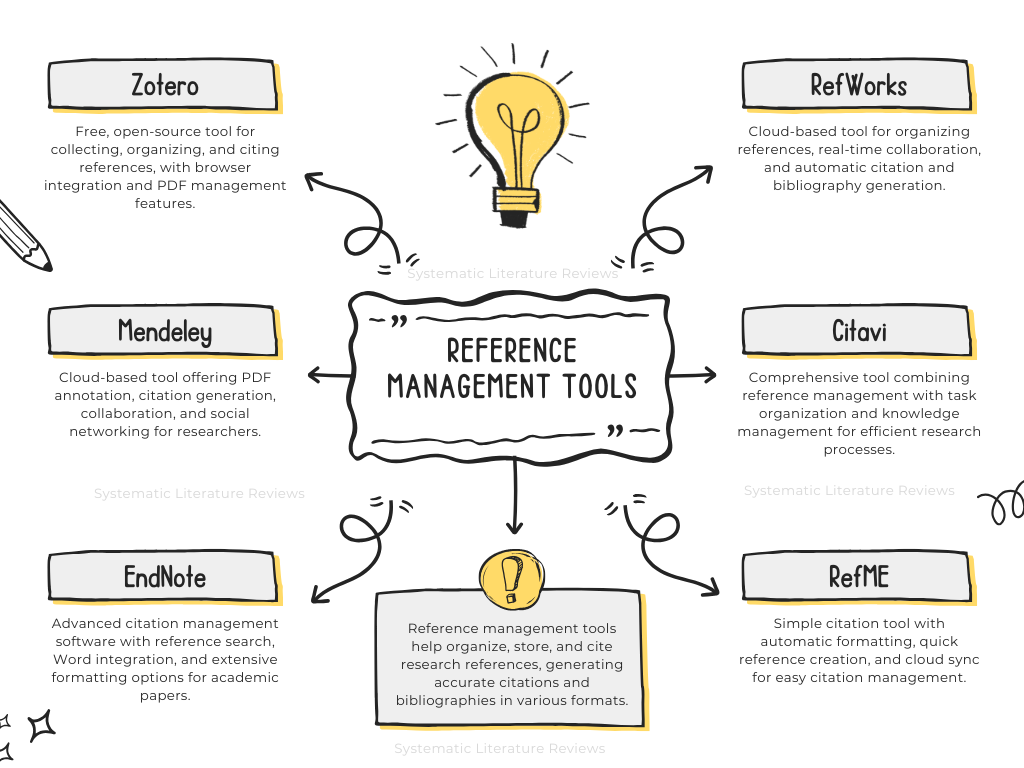
- Zotero: A free, open-source tool that helps you collect, organize, cite, and share research materials. Zotero integrates with your web browser, making it easy to save references directly from websites and academic databases.
- Mendeley: Known for its PDF management capabilities, Mendeley allows users to annotate PDFs and organize them into collections. It’s also a social network for academics, making collaboration easier.
- EndNote: A comprehensive reference management tool used by many professional researchers. It allows for advanced citation management and integration with Microsoft Word.
- RefWorks: A cloud-based reference management tool, which offers similar features as EndNote but with the added advantage of being accessible from anywhere. It’s ideal for collaborative research work.
These Reference Management Tools streamline the citation process and enhance the productivity of researchers, enabling them to focus more on the research itself.
| Parameters | Zotero | Mendeley | EndNote | RefWorks | Citavi | RefME (Cite This for Me) |
| Features | Free, open-source; organizes references; browser integration; PDF management | PDF annotation; cloud-based; social networking; citation generation | Advanced citation management; reference search; integration with Word | Cloud-based; real-time collaboration; citation & bibliography generation | Knowledge management; task planning; integration with Microsoft Word & PDFs | Simple citation generation; barcode scanning; cloud sync; easy reference creation |
| Best For | Academics, researchers, students looking for a free tool | Researchers focusing on PDF management and collaboration | Advanced researchers requiring extensive citation management features | Students and professionals who need a cloud-based tool for collaboration | Researchers looking for task management and knowledge organization | Students and beginners who need a quick, easy citation tool |
| Cost | Free | Free with premium options | Paid (with a free trial) | Paid (with a free trial) | Paid (with a free trial) | Free with premium options |
| Cloud Sync | Yes | Yes | Yes | Yes | Yes | Yes |
Explore the Key Features of Zotero
Zotero is a powerful, free, and open-source reference management tool that helps researchers collect, organize, cite, and share their references. Here’s a closer look at the key features of Zotero that make it one of the most popular Reference Management Tools.
Key Features of Zotero
- Reference Collection: Zotero allows you to collect references from various sources, including books, articles, websites, and more. You can save these references directly from your browser, making it quick and easy to compile your research materials.
- Automatic Citation Generation: Zotero automatically generates citations in multiple formats (APA, MLA, Chicago, etc.), helping you save time on formatting and ensuring accuracy.
- Organize Your References: You can organize your references into collections and tag them with specific keywords to make them easier to find later. Zotero allows you to manage a large number of references without feeling overwhelmed.
- PDF Management: Zotero supports storing and annotating PDFs. You can highlight text, add notes, and even attach files to references, which helps keep all research materials in one place.
- Sync Across Devices: Zotero syncs your references across devices, so you can access them anywhere, whether you’re at home, at work, or on the go.
Zotero’s Integration with Browsers and Word Processors
- Browser Integration: Zotero seamlessly integrates with web browsers like Chrome, Firefox, and Safari. With the Zotero browser extension, you can instantly save citations from websites, databases, or online catalogs with just one click.
- Word Processor Integration: Zotero integrates with Microsoft Word and Google Docs, allowing you to insert citations directly into your document as you write. It also helps you format bibliographies automatically in the correct citation style.
Zotero for Collaboration and Sharing References
- Collaboration: Zotero allows you to share your reference libraries with others, making it an excellent tool for group projects. You can create shared libraries and work collaboratively by adding, editing, and organizing references together.
- Public and Private Groups: Zotero lets you create both public and private groups where you can collaborate on research, share references, and discuss ideas. This makes it ideal for academic teams, research groups, or collaborative research projects.
Zotero stands out as one of the most versatile Reference Management Tools, offering robust features that cater to a variety of research needs while promoting efficiency and collaboration.
Discover the Benefits of Mendeley
Mendeley is another top-rated Reference Management Tool that provides a robust set of features for researchers to organize their references, annotate PDFs, and collaborate with peers. Mendeley is especially useful for managing large amounts of academic papers and citations in an efficient way.
Key Features of Mendeley
- Reference Organization: Mendeley allows you to organize your references into customizable folders. You can easily categorize your citations by topic, research project, or any other system that suits your needs.
- Cloud-Based: Mendeley syncs your references across devices using cloud storage, allowing you to access your references and research materials from anywhere.
- Citation Generation: Mendeley helps generate accurate citations in various formats (APA, MLA, Chicago, etc.), which saves time and ensures that your citations are consistent.
- Search and Filtering: The tool’s search and filtering features make it easy to find specific references in your library, helping you save time when retrieving relevant sources for your research.
Mendeley’s PDF Annotation and Citation Tools
- PDF Annotation: Mendeley allows users to annotate PDFs directly within the software. You can highlight text, add sticky notes, and even draw shapes to make it easier to analyze and organize your research material.
- Integrated Citation Tools: Mendeley integrates with word processors like Microsoft Word and LibreOffice, allowing you to insert citations and generate bibliographies effortlessly while writing. You can use its citation plugin to manage your references directly from the document you are working on.
Mendeley’s Social Networking and Collaboration Features
- Social Networking: Mendeley is not only a Reference Management Tool but also a social network for researchers. You can follow other researchers, join groups, and discover new academic papers. This helps you stay up-to-date with the latest research in your field.
- Collaboration Features: Mendeley enables seamless collaboration among researchers by allowing you to share your references, notes, and annotations with colleagues. You can create private or public groups to collaborate on projects, share documents, and discuss research ideas.
Mendeley is a comprehensive Reference Management Tool that offers powerful features for organizing references, annotating PDFs, and collaborating with other researchers, making it an excellent choice for both individual and group research projects.
Learn About EndNote’s Powerful Features
EndNote is a powerful Reference Management Tool designed to streamline the process of organizing, citing, and managing references for researchers. Its advanced features make it an ideal choice for academics working on large-scale research projects or requiring advanced citation management.
Key Features of EndNote
- Reference Organization: EndNote allows users to store and organize references in a personal library. You can create custom groups, add keywords, and categorize references, making it easier to locate materials when needed.
- Reference Importing: With EndNote, you can easily import references from online databases and websites, saving time on manual entry. This feature supports a wide range of citation styles and formats.
- Citation Styles: The Reference Management Tool supports numerous citation styles, such as APA, MLA, Chicago, and more. EndNote can automatically format citations and bibliographies according to the style required by your academic institution or publisher.
- Cloud Synchronization: EndNote syncs your references across devices, allowing you to access your library from anywhere, whether you’re at home, in the office, or on the go.
EndNote’s Reference Search and Database Management
- Advanced Search Capabilities: One of the standout features of EndNote is its powerful search functionality. You can search your reference library using multiple criteria, such as author, keywords, or publication year, to quickly find the information you need.
- Database Integration: EndNote integrates with popular academic databases like PubMed, Scopus, and Web of Science, enabling you to search and import references directly into your EndNote library. This integration saves time by eliminating the need for manual citation entry.
- Reference Organization: EndNote’s comprehensive database management tools let you organize your references effectively. You can assign tags, categories, and keywords to references, streamlining the process of managing large collections of research materials.
Integration with Microsoft Word for Seamless Referencing
- Cite While You Write: EndNote integrates seamlessly with Microsoft Word, allowing you to insert citations and generate bibliographies directly in your document. The “Cite While You Write” feature ensures that your references are correctly formatted in real-time as you write.
- Automatic Bibliographies: EndNote automatically generates bibliographies based on the citations you’ve inserted into your document. This reduces the time spent manually creating citations and ensures accuracy throughout your paper.
- Multiple Citation Styles: EndNote allows you to switch between different citation styles within Word without having to manually adjust the formatting. This makes it easier to adhere to specific requirements for publication or submission.
EndNote is a robust Reference Management Tool that enhances the efficiency and accuracy of citation management, making it a valuable resource for researchers, scholars, and academics.
Understand the Advantages of RefWorks
RefWorks is a popular Reference Management Tool designed to help researchers and students organize their references, create citations, and manage bibliographies efficiently. It offers a variety of features that streamline the research process, making it a valuable resource for academics worldwide.
Key Features of RefWorks
- Reference Management: RefWorks allows users to easily store and manage their references. You can import citations from databases, websites, and other sources, organizing them into folders for easy access.
- Citation Styles: RefWorks supports a wide range of citation styles, including APA, MLA, Chicago, and more. This flexibility ensures that users can meet the specific formatting requirements of academic institutions or publishers.
- Advanced Search Tools: RefWorks has powerful search tools that allow you to quickly locate specific references in your library. You can search by author, title, keywords, and other criteria to find references relevant to your research.
- Reference Sharing: You can share references with colleagues or collaborators, making it easier to work together on group projects or research papers.
Cloud-Based Access and Collaboration in RefWorks
- Cloud-Based Access: RefWorks is entirely cloud-based, meaning your references are accessible from any device with internet access. This ensures that you can manage your references anywhere, whether you’re in the library, at home, or on the go.
- Real-Time Collaboration: RefWorks makes it easy to collaborate with others by allowing you to share folders and references in real time. Researchers working on group projects can access the same references, making the collaboration process smoother and more efficient.
- Synchronization Across Devices: As a cloud-based tool, RefWorks automatically syncs your references across multiple devices. This means you can start working on your references from one device and continue seamlessly on another.
RefWorks for Citation and Bibliography Generation
- Automatic Citation Generation: RefWorks automatically generates citations for your references in a variety of formats. Whether you’re writing a paper in APA or another style, RefWorks ensures your citations are formatted correctly.
- Bibliography Creation: RefWorks also generates bibliographies based on the citations you’ve added to your research. You can create a bibliography at any time, saving you the hassle of manual formatting.
- Integration with Word Processors: RefWorks integrates with Microsoft Word and Google Docs, enabling you to insert citations directly into your document as you write. This integration streamlines the process of adding references and ensures consistency throughout your work.
RefWorks is an efficient Reference Management Tool that offers cloud-based access, real-time collaboration, and easy citation generation, making it an essential tool for researchers, students, and academics.
Explore the Capabilities of Citavi
Citavi is a powerful Reference Management Tool that combines reference management with task and knowledge organization. This tool is particularly useful for researchers looking for an all-in-one solution to manage their citations, organize research materials, and enhance collaboration.
Key Features of Citavi
- Reference Management: Citavi helps users store and organize references from a variety of sources, including databases, websites, and more. It allows you to categorize your references, making it easy to locate them when needed.
- Citation Styles: Citavi supports a wide range of citation styles, such as APA, MLA, Chicago, and many more. This ensures that you can quickly format your references according to the citation style required for your work.
- Bibliography Generation: Citavi automatically generates accurate bibliographies based on the citations you’ve entered into your library, saving you time and ensuring accuracy.
- Collaboration Tools: Citavi allows you to share references with others, which is useful for group projects or academic collaborations. Multiple users can access and work on the same reference library simultaneously.
Citavi’s Knowledge Management Capabilities
- Organize Your Research: Citavi’s unique feature is its ability to manage your research knowledge. You can take notes, create summaries, and link these notes directly to specific references or parts of your paper. This feature allows for better organization of research materials.
- Task Planning: Citavi offers task management features that help you track research progress. You can create tasks, set deadlines, and organize research activities, helping you stay on top of your project timelines.
- Quote Management: Citavi allows you to store and organize quotes from your references, making it easier to find and cite them later. This functionality supports more efficient writing and citation work.
Citavi’s Integration with Microsoft Word and PDFs
- Microsoft Word Integration: Citavi integrates seamlessly with Microsoft Word, allowing you to insert citations and create bibliographies directly in your document. You can choose from a variety of citation styles, and Citavi will format your references in real-time as you write.
- PDF Management: Citavi also integrates with PDF files, enabling you to attach PDFs to references. You can annotate and highlight PDFs within the software, making it easier to manage your research materials and extract information.
Citavi stands out as one of the most comprehensive Reference Management Tools, offering not only reference management capabilities but also robust knowledge management and task organization features to help streamline the research process.
Get to Know RefME (Cite This For Me)
RefME, now known as Cite This For Me, is a user-friendly Reference Management Tool that helps researchers, students, and professionals generate accurate citations and bibliographies in various formats. RefME simplifies the citation process and helps users manage references efficiently with its intuitive features.
Key Features of RefME
- Citation Styles: RefME supports a wide array of citation styles, including APA, MLA, Chicago, Harvard, and more. This versatility ensures that you can quickly adapt the tool to the specific citation requirements of your research.
- Reference Organization: RefME enables users to organize their references into projects or folders, making it easy to manage different research materials. You can also add personal notes to each reference for better organization.
- Real-Time Citation Generation: RefME allows you to generate citations as you go, automatically formatting them in your preferred citation style. This eliminates the need to manually format references, saving time and reducing errors.
Systematic Literature Review Assistance
Struggling with your systematic literature review? Our experienced team is here to help! We offer step-by-step guidance to ensure your review meets the highest academic standards. Get started with us now!
RefME’s Simple Citation Generation Process
- Easy Reference Creation: RefME streamlines the process of creating citations. You can input references by manually adding them, scanning barcodes from books, or directly importing information from online sources. RefME gathers the necessary information to generate a properly formatted citation in a matter of seconds.
- Automatic Formatting: Once a reference is added, RefME automatically formats it according to your chosen citation style. This ensures your citations are accurate and consistent without any manual intervention.
- Bibliography Creation: RefME can automatically compile your citations into a formatted bibliography. With just a few clicks, you can generate a complete list of references for your research paper or thesis.
RefME for Quick Reference Creation and Organization
- User-Friendly Interface: RefME is known for its simple, intuitive design. The platform makes it easy to create and organize references without a steep learning curve, making it a great option for beginners.
- Cloud Synchronization: RefME stores your references in the cloud, meaning your library is accessible from any device with internet access. You can organize your references, add new ones, and generate citations on the go.
- Quick Access and Editing: You can edit references easily within the platform, allowing you to update citations or add new ones as needed. This flexibility helps maintain a well-organized and up-to-date reference library.
RefME, or Cite This For Me, is a practical Reference Management Tool that allows for quick reference creation, organization, and citation generation. It’s a simple yet powerful solution for anyone looking to manage references and citations efficiently.

